


Most website redesigns fail before a single wireframe is drawn. The brief says "we want something fresh," and the project kicks off. Six months later, the site looks better but converts exactly the same. Sometimes worse.
A website redesign is not a visual upgrade. It is a business system overhaul. Done right, it increases conversions, protects search rankings, and gives your team a platform that actually scales. Done wrong, it is expensive rework disguised as progress.
This checklist is built for founders, marketing leaders, and business owners who want to get it right not just get it done.
Before you begin, get precise about the scope. There are three distinct types of website projects, and they are not interchangeable:
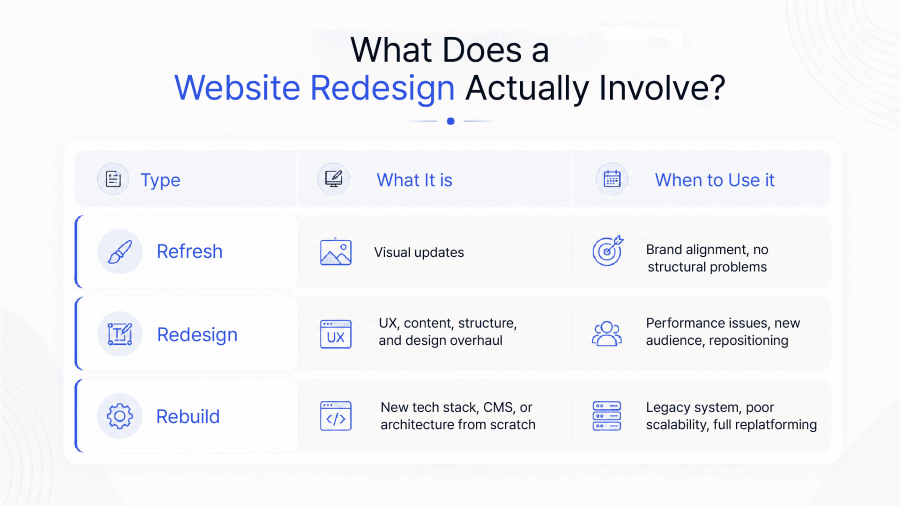
Most clients come in asking for a "refresh" and leave with a "redesign" once the audit is complete. Start with an honest scope conversation not a mood board.
"We want it to look more modern." That is not a brief. That is a preference.
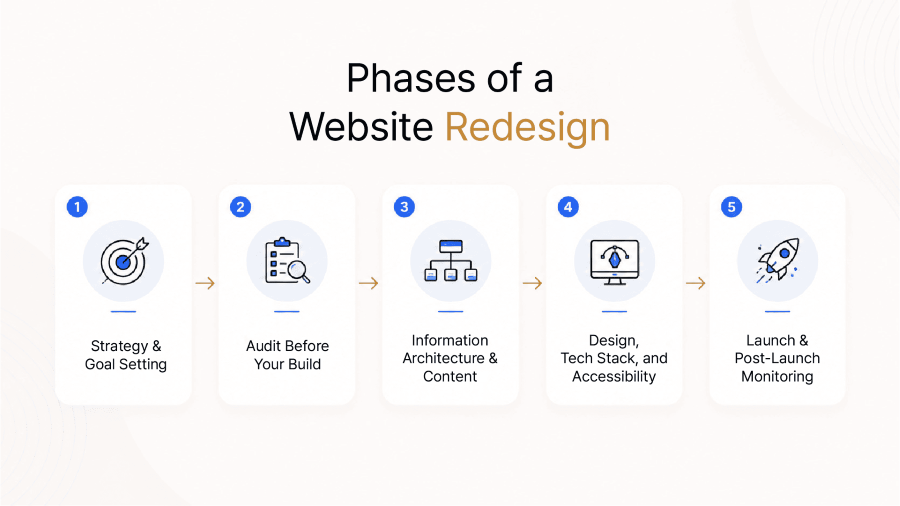
Before any design work begins, define what success actually means in measurable terms.
Your Goal-Setting Checklist:
Key Insight: Research consistently shows that redesigns fail most often due to vague goals not poor design execution. "Looking modern" is not a KPI. "Reducing bounce rate from 72% to 45%" is.
Your current website no matter how outdated contains data that is worth more than any creative brief. Use it.
2a. Technical Audit
Check for structural issues that will follow you into the new site if not addressed:
2b. SEO Audit
This is the most commonly skipped step and the most expensive mistake.
Warning: The majority of SEO ranking loss during a redesign happens in the 30 days post-launch not during the build. Skipping the redirect plan is the most common cause.
2c. Content Audit
2d. UX Audit
Information Architecture (IA) is the skeleton of your website. Most redesigns focus on the skin and ignore the bones.
Sitemap & Navigation:
Content Collection:
One of the most consistently underestimated phases of any redesign is content collection. It is the #1 cause of timeline delays.
Integra Magna Principle: Design cannot be finalized before content is ready. Designing around placeholder text is designing around a lie. Content shapes layout not the other way around.
Design Foundation:
Technology Stack:
Accessibility (WCAG 2.2):
By 2026, accessibility is not optional. It is a legal, ethical, and SEO requirement:
The redesign does not end at launch. That is when the measurement begins.
Pre-Launch:
Day 30: Core Web Vitals, Search Console impressions, bounce rate, page indexing
Day 60: Keyword ranking changes, conversion rate vs. baseline, lead form performance
Day 90: Organic traffic trend, top landing pages, user flow through key conversion funnels
A website is not a finished product. It is a living system. Plan for ongoing iteration based on real user data not internal preference.
A website redesign done right is one of the highest-leverage investments a business can make. Done without a plan, it is one of the most expensive ways to stand still.
The checklist above is not about covering bases. It is about making decisions with intent knowing why each step exists and what it protects.
At Integra Magna, we treat every redesign as a business system conversation, not a design brief. Strategy, UX, development, and CMS architecture are handled together so nothing gets lost in translation.
If your current website is underperforming, scattering your brand, or holding your growth back, let's talk about what a redesign should actually look like for your business.
How long does a website redesign take?
A typical website redesign for a business site takes 8–16 weeks, depending on scope, complexity, and how quickly content and approvals are provided by the client. Larger e-commerce or multi-market sites can take 4–6 months. The most common delay factor is content collection, not design or development.
What should I do before redesigning my website?
Before any design work begins, you should: (1) define measurable business goals, (2) conduct a technical, SEO, and content audit of your current site, (3) map your target audience and their key journey on the site, and (4) collect all updated content copy, photography, and case studies. Starting without these inputs guarantees misalignment.
How do I redesign a website without losing SEO?
To protect SEO during a redesign: map every existing URL and its traffic before you start, plan 301 redirects for any URL that changes, retain or improve the content depth of your highest-performing pages, and submit a new sitemap to Google Search Console immediately after launch. Monitor Search Console closely for the first 30 days for any indexing issues.
What is the most common reason website redesigns fail?
Vague goals. Most redesign briefs describe aesthetics ("we want something modern") rather than outcomes ("we need to reduce our bounce rate and increase lead form submissions"). Without measurable objectives, there is no way to know whether the new site succeeded or not which means the team defaults to subjective preference and the project stalls.
Do I need a design agency for a website redesign?
It depends on scope and internal capability. If the redesign involves significant UX changes, a new tech stack, CMS migration, or brand repositioning working with a specialist studio is more efficient than managing disconnected freelancers. The real risk of a DIY or fragmented approach is handover loss: information and intent that disappears between strategy, design,