
Every week, someone asks us which platform they should build their website on. It is one of the most consequential decisions a business makes and one of the most commonly made on the wrong grounds: because a friend recommended it, because it is what the previous agency used, or because it appeared first in a Google search.
The honest answer is not "it depends." The honest answer is: each of these platforms is built for a fundamentally different job, and choosing the wrong one for your business creates problems that compound over the years.
The bottom line: Webflow is for brand-led businesses that need design precision and visual control. WordPress is for businesses that need maximum flexibility, content scale, or custom functionality. Shopify is for businesses whose primary function is selling products online. Choose based on your primary business goal, not on which platform is most popular.
Before going into depth, here is how the three platforms stack up across the dimensions that matter most for business owners.
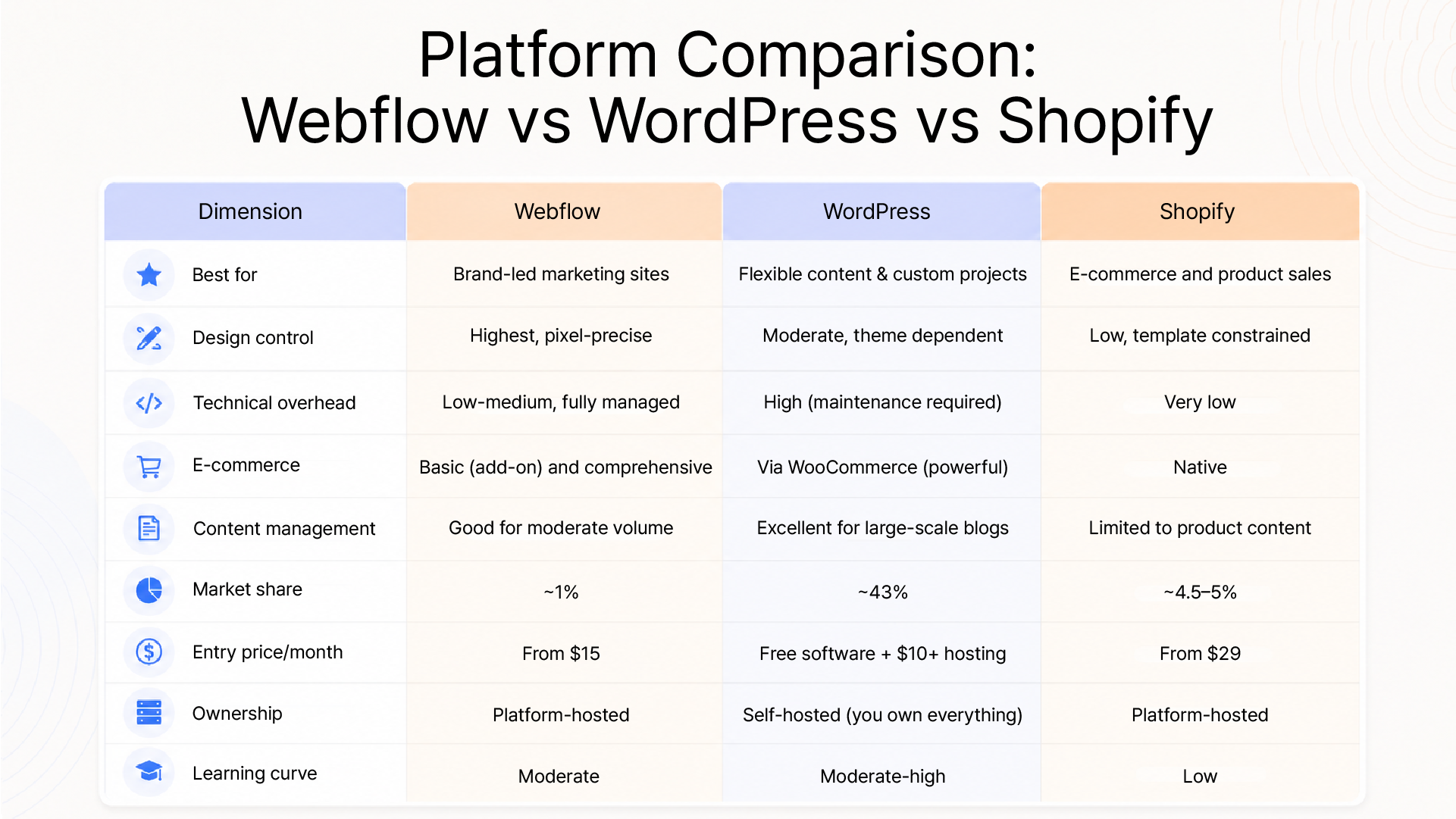
Now, let us go deeper into each.
Webflow is a visual development platform, not a traditional website builder, and not a conventional CMS. It bridges the space between design tools like Figma and full development environments, allowing designers and studios to build pixel-perfect websites without writing front-end code from scratch.
The Webflow verdict: If your website's primary job is to present your brand, convert visitors through design, and support a marketing team, not process thousands of e-commerce transactions or manage vast content libraries, Webflow is the superior choice for visual quality and long-term maintenance simplicity.
WordPress powers approximately 43% of all websites on the internet and roughly 60% of the CMS market. It is the most widely deployed content management system in history. That dominance comes from one source: flexibility.
WordPress is open-source software. You install it on your own hosting environment and own every file, every database, and every line of code. The plugin ecosystem with over 60,000 plugins means you can extend it to do almost anything.
The WordPress verdict: If you need a platform that can grow into any shape your business takes, if content volume is large, customisation requirements are significant, or you have access to development support, WordPress offers the best long-term return on investment. If you are trying to DIY it without technical support, reconsider.
Shopify is not a general-purpose website builder. It is an e-commerce operating system, and it is exceptionally good at its specific job. If your primary business goal is selling products online at scale, no other platform matches Shopify's out-of-the-box capability.
Design flexibility: Shopify's theme system constrains design more than Webflow or a custom WordPress build. Pixel-precise brand expression is harder to achieve without significant developer customisation.
Non-commerce content: If your marketing strategy relies heavily on content, such as long-form blogs, resource libraries, and thought leadership, Shopify's CMS is not built for it.
Cost at scale: Transaction fees (if not using Shopify Payments), app costs, and theme investments add up. A fully-featured Shopify store often costs considerably more than the base subscription suggests.
The Shopify verdict: If you sell physical or digital products and your growth strategy involves scaling a product catalogue, optimising checkout conversion, and managing fulfilment, Shopify is your platform. Do not use it as a marketing website. Do not use it for content-led businesses. Use it to sell things.
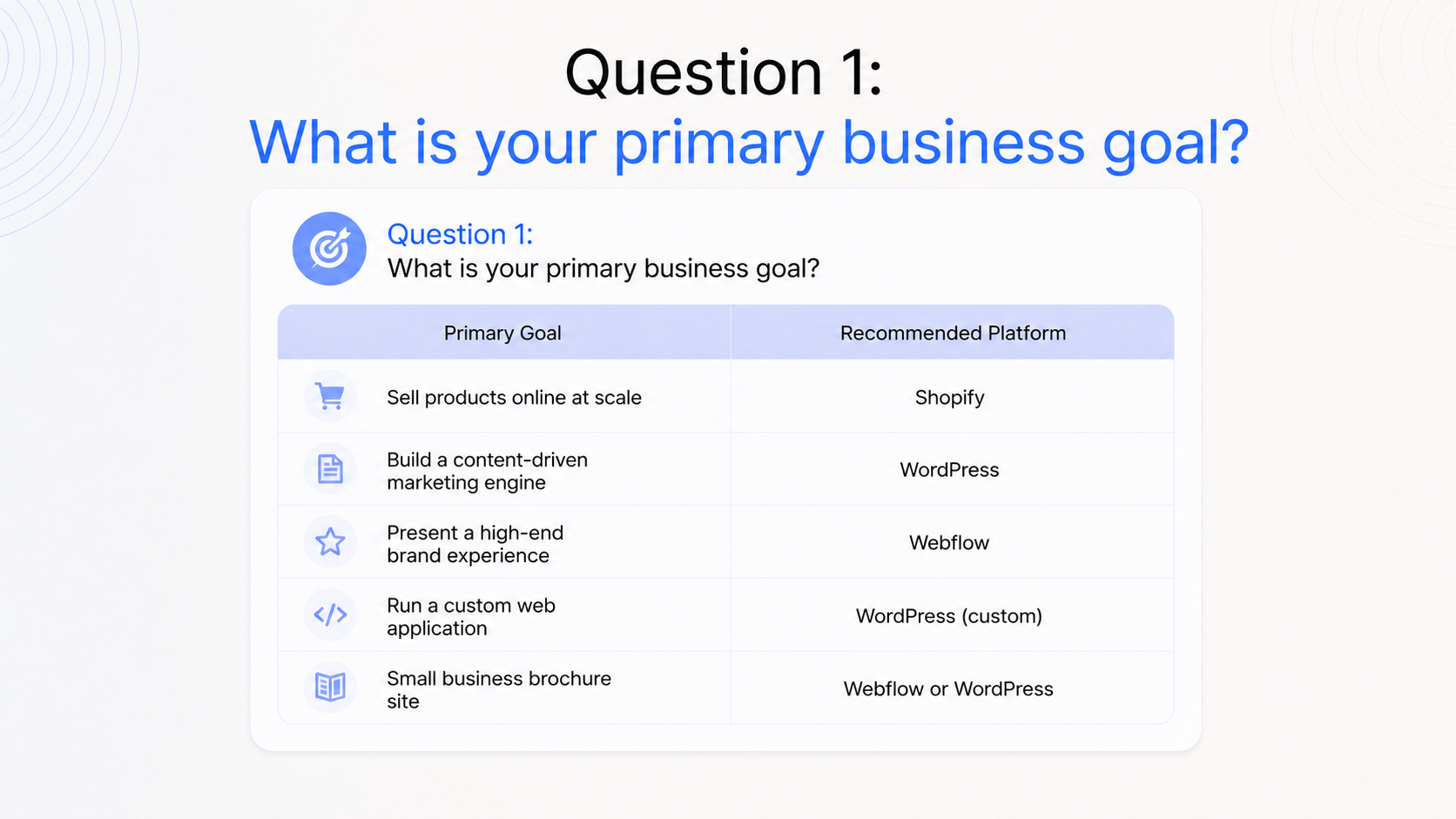
Stop asking "which platform is best?" and start asking "which platform is best for this business?"
Three questions will give you a clear answer:
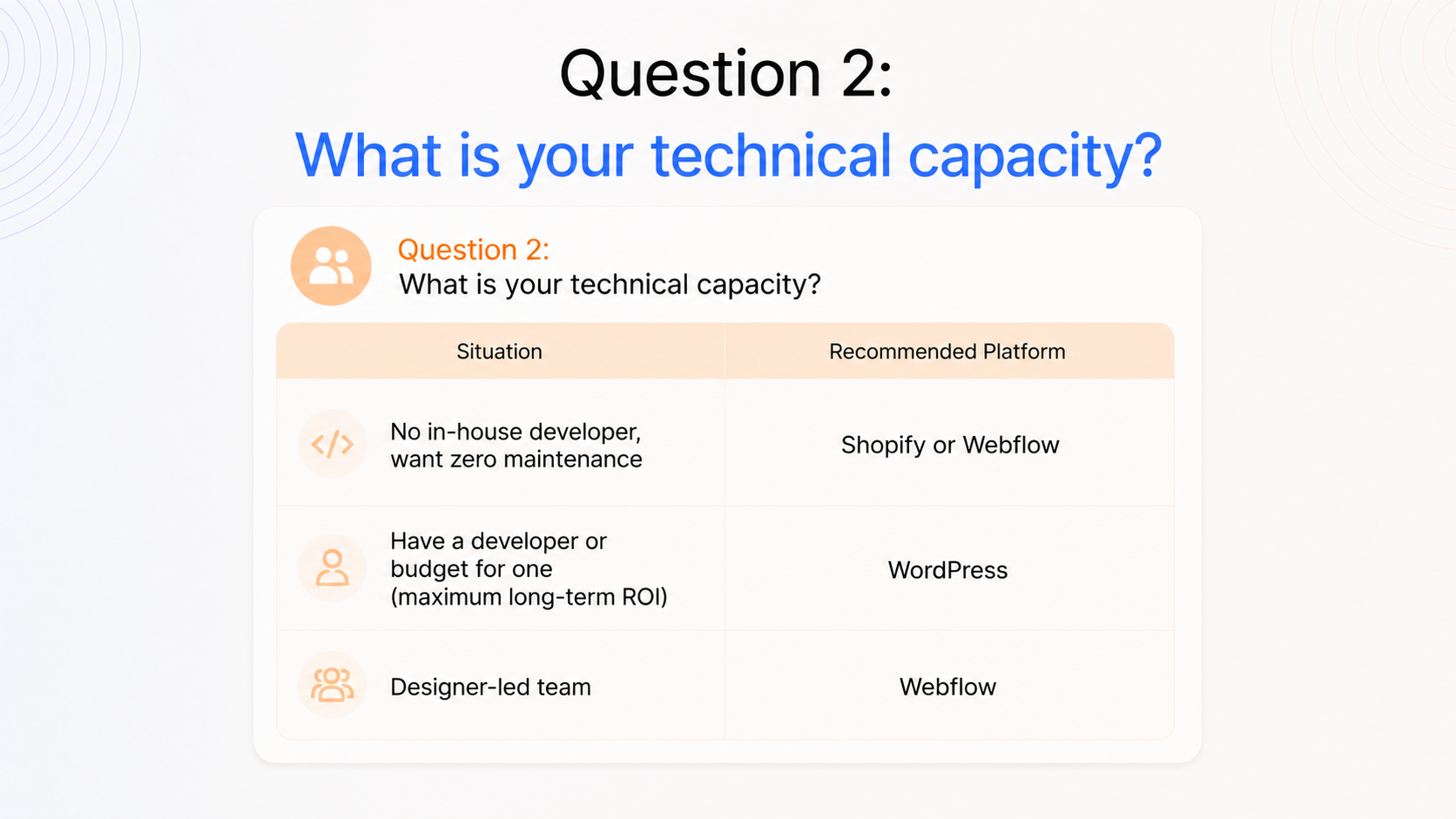
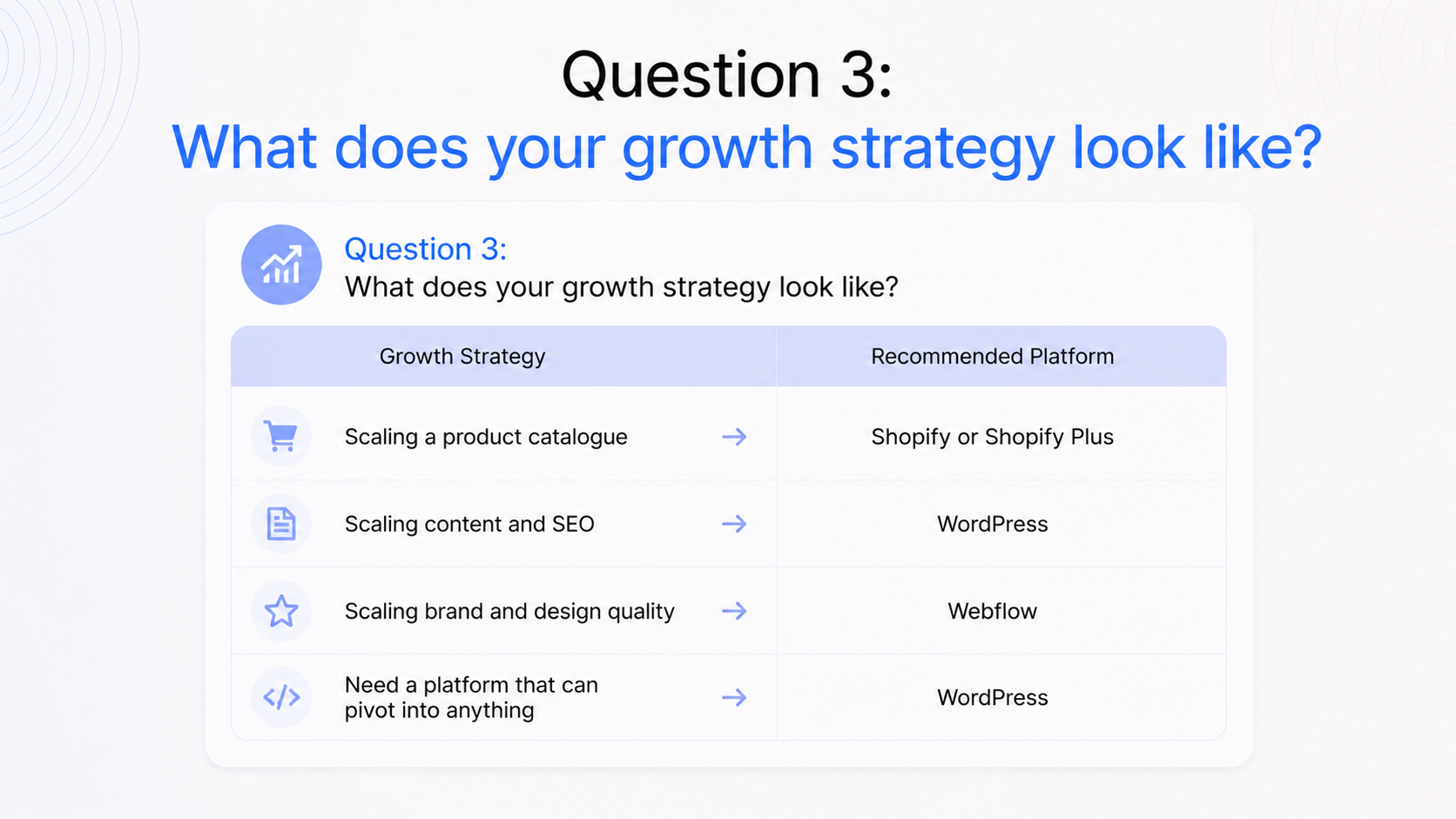
The business that needs a Webflow site and builds it on WordPress will spend years fighting their CMS for design control. The business that needs a WordPress content engine and builds it on Shopify will eventually migrate anyway. Getting the platform decision right at the start saves two to three years of technical debt.
Here is the honest view, including what vendors do not put on their pricing pages.
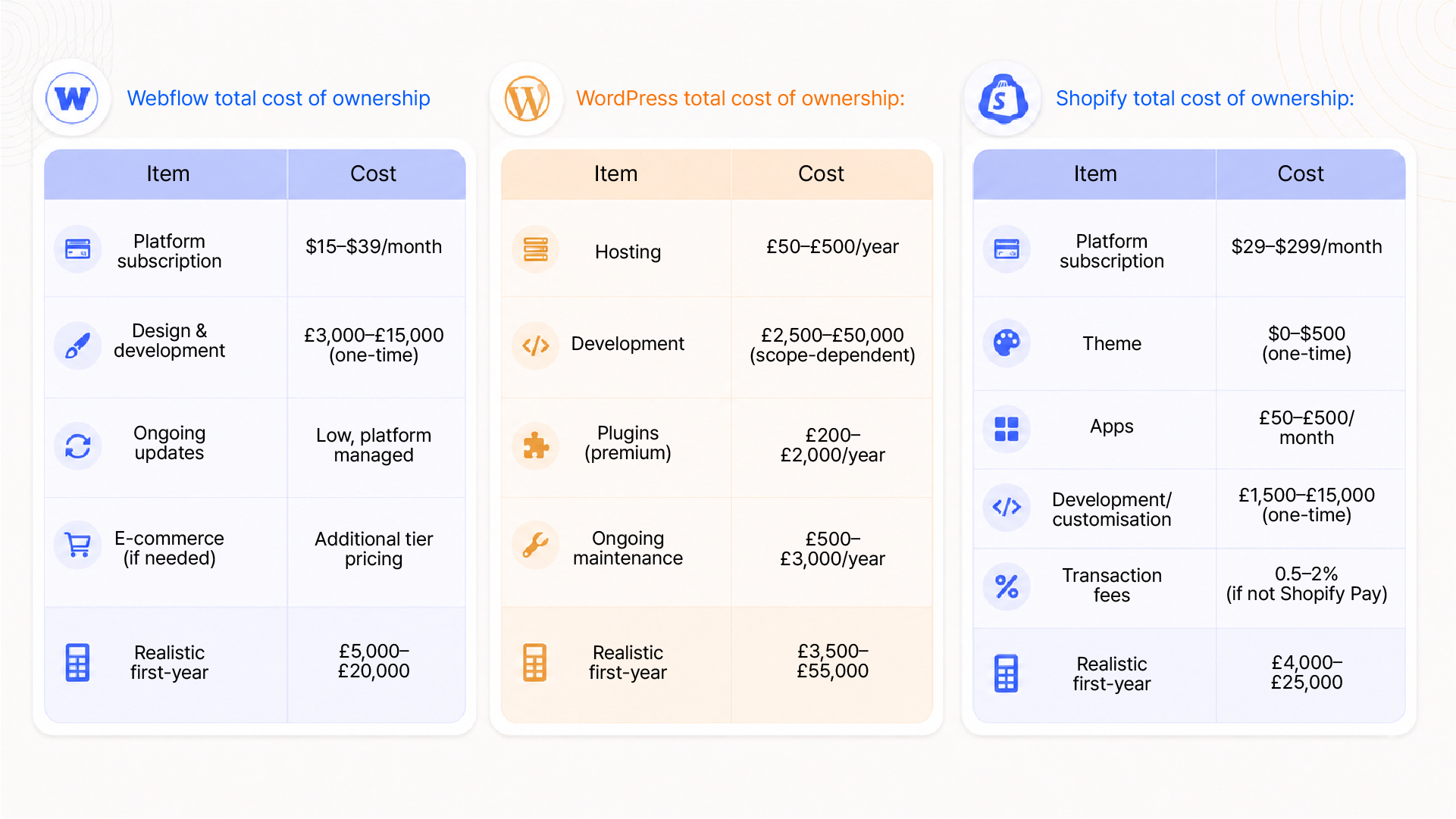
Webflow, WordPress, and Shopify are not competing for the same job. There are three different tools designed for three different primary functions: design precision, content flexibility, and e-commerce operations.
The businesses that make the wrong choice typically do so for the wrong reasons: a recommendation without context, a perceived cost saving that creates technical debt, or a default to the most familiar name.
If you are brand-led and design matters, Webflow.
If you need a content scale and full ownership, WordPress.
If you sell products, Shopify.
The platform is the foundation. Everything you build SEO performance, conversion rate, brand credibility, and marketing scalability sits on top of it. Getting it right at the start is one of the highest-leverage decisions a growing business makes.
At Integra Magna, we are platform-agnostic. We recommend what is right for the brief, not what is easiest to sell. If you are making a platform decision and want an honest recommendation based on your business goals, let us talk.
Webflow is a visual development platform best suited for brand-led marketing websites that require design precision and managed infrastructure. WordPress is an open-source CMS built for content flexibility, large-scale publishing, and maximum customisation. Shopify is an e-commerce operating system built specifically for selling products online. It handles payments, inventory, shipping, and fulfilment natively. Each platform excels at a specific job; the right choice depends on your primary business goal.
All three platforms can perform well for SEO with proper implementation. WordPress has the most mature SEO plugin ecosystem (Yoast, RankMath) and is strongest for content-led SEO strategies. Webflow generates clean, fast code and provides strong Core Web Vitals performance out of the box, which benefits technical SEO. Shopify is adequate for product-focused SEO but limited for content marketing. Platform choice affects SEO; content quality and technical implementation affect it more.
For brand and design-led projects, yes, Webflow offers superior design control, cleaner code output, and lower maintenance overhead. Agencies that build and hand over client sites often prefer Webflow for marketing and brand sites because clients can update content without breaking layouts. However, WordPress remains more capable for large editorial operations, complex custom functionality, or projects where full database ownership is a requirement.
For straightforward to mid-complexity product sales, Shopify is the more reliable choice, as its payment processing, inventory management, shipping integrations, and performance infrastructure are built specifically for e-commerce and require no plugin assembly.